26.04.00 Release Notes
This release is all about speed, clarity, and trust. We've tightened up the login experience for enterprise users, made navigation faster, and ensured your environment stays clean and performant without any extra effort on your part. Plus, search just got a whole lot smarter!
IMPROVEMENTS
-
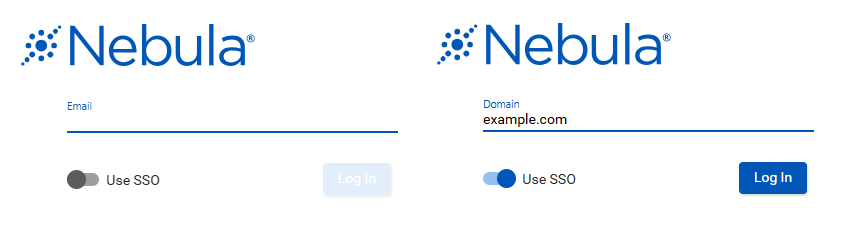
More Secure SSO Login: SSO users now enter their domain upfront with a new toggle and domain field before signing in.
-
Client benefit: Your login flow now matches modern enterprise security standards - smoother and safer for everyone.
-
-
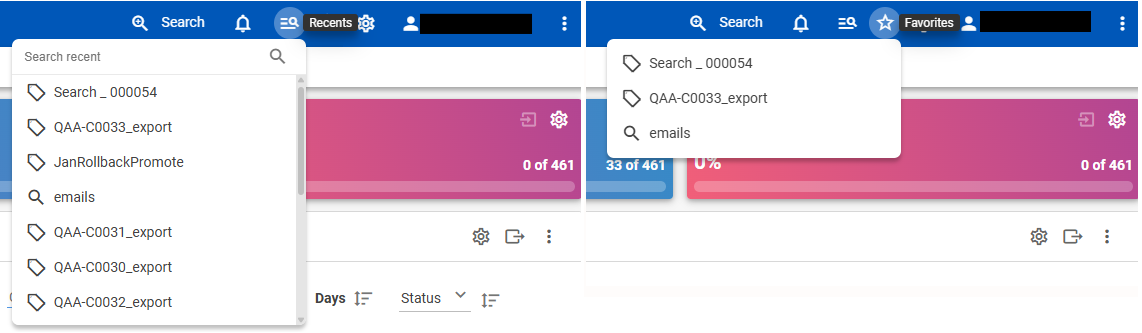
Separated Recent & Favorites - Finding what you need is now instant. Recent items and your saved Favorites live in their own dedicated menus, so you're never hunting through a combined list again.
-
Client benefit: Less clicking, less frustration - the things you use most are always right where you expect them.
-
-
Automatic Cleanup of Collection Data: Source data from collections is automatically removed after 90 days.
-
Client benefit: Your environment stays lean and organized with zero manual housekeeping - storage manages itself.
-
-
Faster Search Index Updates: Only documents missing from the search index are processed by default - everything already indexed is skipped.
-
Client benefit: Reindexing that used to take ages now finishes in a fraction of the time.
-

-
More Accurate Search for Complex Terms: Searches with quotation marks and underscores now return exactly what you're looking for.
-
Client benefit: No more unexpected mismatches or missing results when searching for specific terms or file names.
-
BUG FIXES
- Document imaging is more resilient: Minor errors no longer cause the entire imaging job to fail.
- Keywords now display friendly names in Recents & Favorites: Keywords without a custom alias now show the readable query value in Recents, Favorites, and breadcrumbs instead of an internal ID.
- Document list now loads correctly for all users: Users with Keywords access but without Search permission can now open the document list without errors.
- Sort icons now update correctly on custom fields: Clicking the sort icon on custom fields in the Document List View now correctly reflects the selected sort direction.
- Large documents with quoted text now index correctly: Files truncated at the size limit that contained quotes at the cut-off point were silently failing to index - quoting is now handled correctly, so these documents are processed without errors.
- Viewing empty documents no longer throws an error: Opening a document with no text content now works without displaying an error.
- Document indexing is more resilient: Minor errors during indexing no longer fail the entire batch - affected documents are skipped while the rest are processed normally.
- Duplicate file shares prevented: Submitting the same share request multiple times in quick succession no longer creates duplicate entries.
- Native files now download correctly via the public export API: Fixed an issue that prevented native files from being downloaded through the public export API.
WHAT'S COMING NEXT
We're not slowing down. Here's a glimpse at what we're building for you next - some of these are closer than you think!
- AI Case Explorer - Understand your case in hours, not days. Our new AI-powered analysis tool automatically surfaces key themes, critical people, important dates, and hot documents across your entire document set - before you manually review a single file.
- AI Agent Review - AI agents will perform first-pass document coding for relevance while your attorneys focus on quality validation - dramatically cutting the time and cost of large review matters.
- Inline OCR - No more manual OCR steps after processing. OCR will run automatically during document ingestion, so your documents come back already searchable saving time and eliminating a step your team had to remember to do.
- Self-Service Password Reset - Forgot your password before a big case? Soon you'll be able to reset it yourself in minutes - no support ticket, no waiting, no delays. Available at any time of day or night.
- PII Highlighting - PII detection results will finally show up where you need them: highlighted directly in the document view, with the ability to toggle, filter, and navigate just like search hits.
- Auto-Redaction Review - Approve, delete, or amend redactions in bulk rather than one at a time. A whole new way to handle large redaction sets, fast.
...and many many more on the way!